Software programming is now part of modern commercial truck repair. On a 2022 Freightliner Cascadia with a DD15 engine, a truck problem may involve more than a mechanical part. The issue can also involve module communication, software configuration, calibration, electrical supply, or a previous repair that needs to be completed correctly.
That does not mean every fault needs programming. It means the truck should be diagnosed clearly before a programming decision is made.
SAAT Repairs Corp provides mobile truck repair, advanced diagnostics, and software programming support for commercial trucks in Tampa, Lakeland, and nearby areas. When a Cascadia with DD15 needs programming work, the goal is to approach the truck carefully, protect the modules, and avoid guessing.
Why programming may be needed on a 2022 Cascadia with DD15
A 2022 Cascadia with DD15 may need programming support after certain service situations, including module replacement, calibration work, software-related faults, communication issues, or electrical repairs that affect how the truck's systems interact.
Programming can also become part of the process when the truck has symptoms that continue after a mechanical repair, or when the system needs to confirm that the correct file, module, or configuration is in place.
The important point is simple: programming should be treated as a controlled service step, not as a quick guess.
What TRASDATA is used for in a programming workflow
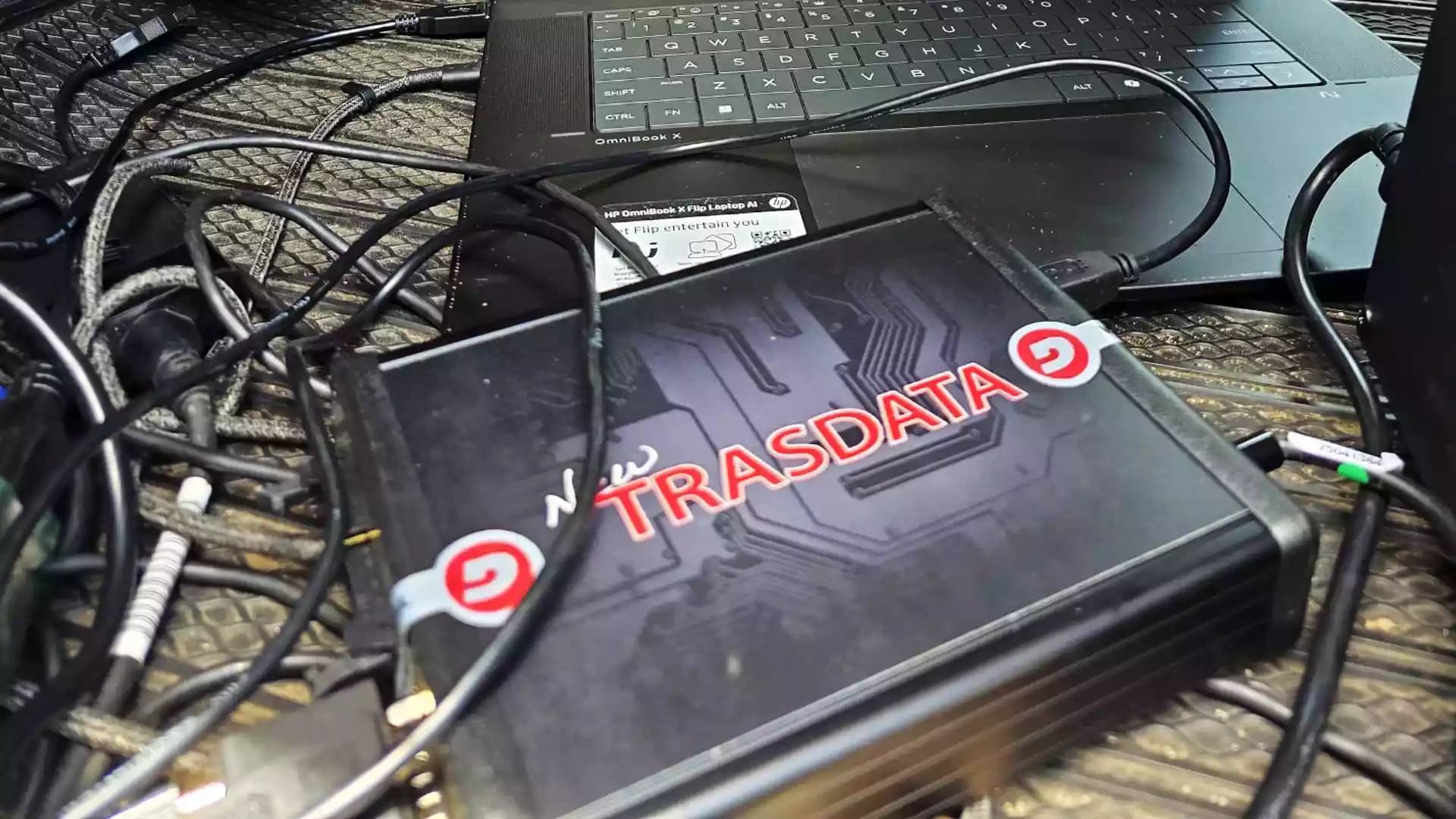
TRASDATA is a professional programming tool used in vehicle electronic control module workflows. In the type of setup shown in the client-provided images, the equipment is connected inside the truck while the technician works from a laptop and monitors communication, power, and software activity.
The exact use depends on the truck, the module, the job objective, and the repair context. A responsible programming workflow should focus on correct identification, stable conditions, and proper diagnostic direction.
Programming should not be treated as a shortcut around proper repair. Software work is most useful when it supports the right diagnosis.
Why diagnostics should come before programming
Many truck problems look electronic at first. A warning light, derate, no-start condition, communication fault, or recurring code can make programming seem like the first answer.
But programming is not always the fix. A weak battery, damaged wiring, poor ground, failed sensor, connector issue, or incorrect previous repair can create symptoms that look software-related.
That is why diagnostics should come first. Before programming, a technician should understand what the truck is doing, which modules are communicating, what fault codes are present, and whether the electrical conditions are stable enough to continue.
What a technician should confirm before starting
Programming a commercial truck module requires a controlled process. The details can change from job to job, but several checks matter before the work begins.
Truck identification and module information
The technician should confirm the truck information, engine platform, module details, and the service goal. On a 2022 Cascadia with DD15, this helps avoid applying the wrong assumptions to the wrong system.
The customer should share the truck year, engine information, VIN if requested, recent repair history, and the exact symptoms that led to the service call.
Battery voltage and power support
Stable voltage matters during programming. A voltage drop at the wrong moment can interrupt communication and create additional problems.
The client-provided images show power support equipment in the cab area, which is a useful visual reminder: programming is not only about the laptop. The truck needs a stable electrical environment before the technician proceeds.
Communication with the correct module
Before starting a write or programming step, the technician should confirm communication with the correct module. If the tool cannot communicate correctly, the issue may involve wiring, power, ground, network communication, or module condition.
Skipping this step can lead to wasted time or a wrong repair direction.
Symptoms, fault codes, and recent repairs
Programming decisions should be connected to the real symptom. For example, a truck that has a no-start complaint, derate, warning lights, or communication codes may require different checks before software work begins.
Recent repairs also matter. If a module was replaced, a harness was disturbed, or batteries were disconnected, those details can change the diagnostic path.
What drivers and fleets should prepare before calling
Before requesting programming or advanced diagnostics, prepare the information that helps the technician understand the situation:
Exact truck location.
Truck year, make, model, and engine information.
VIN if available.
Dashboard warning lights or messages.
Whether the truck starts, runs, derates, or will not communicate.
Recent repair history.
Whether a module was replaced.
Any fault code report or photos of the dash.
Battery condition if known.
Photos of the equipment setup or affected area, if safe and relevant.
Clear information helps the first conversation move faster and reduces guessing.
What programming cannot solve by itself
Programming is powerful, but it does not replace mechanical or electrical diagnosis.
Software work will not fix a damaged harness, weak batteries, poor grounds, failed sensors, fluid leaks, or mechanical problems that are causing the fault. It also should not be used as a way to bypass required systems or create unsupported modifications.
If the root problem is outside the software, the right next step is to correct that problem first.
Why mobile diagnostics matter for Tampa and Lakeland operators
For drivers, owner-operators, and fleets in Tampa, Lakeland, and nearby areas, downtime can start in a yard, at a delivery location, at a parking area, or on the road. Mobile diagnostics can help evaluate the truck where it sits and determine whether programming is part of the correct repair path.
This is especially useful when the truck has electronic symptoms that make it hard to decide whether to move the unit, keep troubleshooting, or request specialized support.
Contact SAAT Repairs Corp
If your 2022 Cascadia with DD15 needs advanced diagnostics or programming support, contact SAAT Repairs Corp for mobile truck repair in Tampa, Lakeland, and nearby areas.
Share the truck location, symptoms, warning messages, recent repairs, and photos if available. The more precise the information, the better the technician can prepare for the service call.